
Measure your real-time energy and/or water usage in Home Assistant
The WaterP1MeterKit V4 with built-in WiFi, Ethernet and PoE is our newest and most flexible solution. Thanks to the detachable water sensor, you can read only your energy meter, only your water meter, or both at the same time. The V4 also includes an extra expansion port and is prepared for Thread/OpenThread for users with a suitable Thread network.
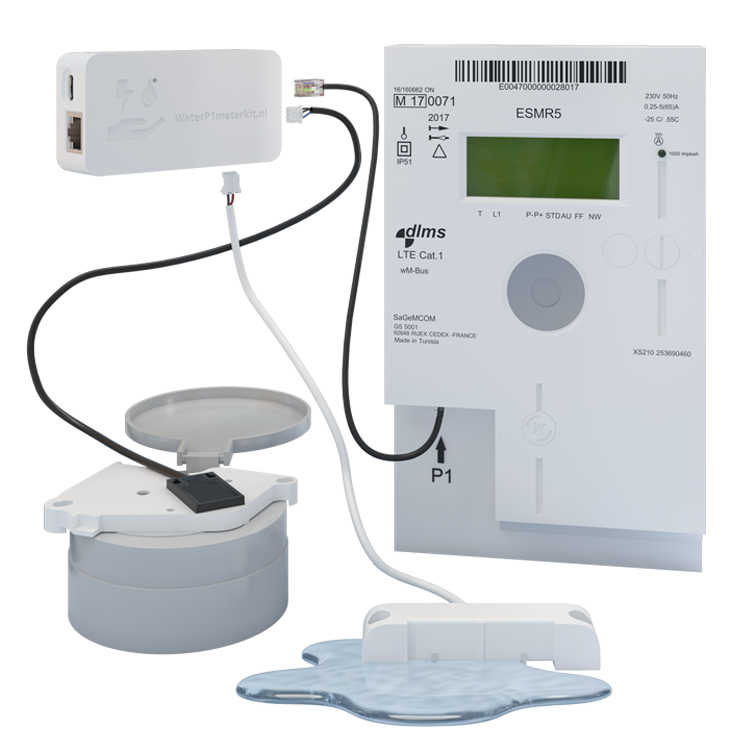
Discover the WaterP1MeterKit: A meticulously handcrafted Dutch creation, fully developed and designed to meet your needs.
Use Home Assistant for dashboards and automations. Without Home Assistant, custom ESPHome firmware can use MQTT, for example. DSMR Reader handles energy data, not the separate water sensor.
Maximum flexibility: Measure energy, water, or both
The V4 gives you the choice: use exclusively the detachable water sensor for water consumption, only the P1 connection for energy consumption, or combine both for total insight. The separate water sensor with 3-meter cable offers maximum installation flexibility.
Example with simulated readings. The kit measures total consumption; the appliances shown are examples and are not identified individually.
Home Assistant
Full integration
Make your DSMR meter even smarter and more insightful.
Read electricity and gas usage from a compatible P1 energy meter with WaterP1MeterKit. You see total meter consumption; individual appliances are not automatically identified.
Home Assistant
Full integration
DSMR Reader
Compatible
Installation examples, Easy to mount in under 1 minute
Below you'll find 3 example installation videos for popular water meter types. Our universal holder works with many more brands, see the compatible water meters list below for a complete overview.
Compatible water meters
Our universal holder fits most European analog water meters. Below you’ll find the most common types per brand.


Different water meter brand?
Our sensor detects the metal rotating disc in analog water meters. This small metal disc (often silver-colored) rotates when water flows through. The sensor registers each rotation via magnetic detection = 1 liter of water. ⚠️ No rotating metal part? Then our sensor won't work.
Not sure if your water meter is compatible? Send us a photo!
Compatible energy meters
For DSMR 4 and 5 / ESMR 5 with a suitable P1 port. Check the meter model and protocol; an RJ12 connector alone is not a guarantee. Have older meters checked first.

What’s in the V4 box?
- WaterP1MeterKit V4 main unit with WiFi, Ethernet and PoE support
- Prepared for Thread/OpenThread with matching firmware and a Thread border router
- Separate water sensor with 3‑meter cable
- Universal holder for water meter (fits most European meters)
- RJ12 cable (2 m) for DSMR energy meter
- Quick Start Guide with installation instructions
Optional accessories
- USB‑C cable (3 m) & Power Adapter: EU or Universal (US/AU/UK)
- Water leak sensor or door sensor for the expansion port
V4 advantages
- Flexible setup: separate 3‑meter water sensor, place exactly where needed
- Measure energy, water or both simultaneously
- Switch between WiFi and Ethernet in software; PoE supported
- Prepared for Thread/OpenThread for modern Thread networks
V4: Even more possibilities and flexibility in Home Assistant
The WaterP1MeterKit V4 builds on the previous generation and adds modern hardware prepared for Thread/OpenThread. You still choose exactly what you need: energy only, water only, or both at the same time. The 3-meter detachable water sensor cable enables installation in challenging situations, even when your water meter and meter cabinet are far apart. The expansion port can optionally be used for a water leak sensor or door contact.
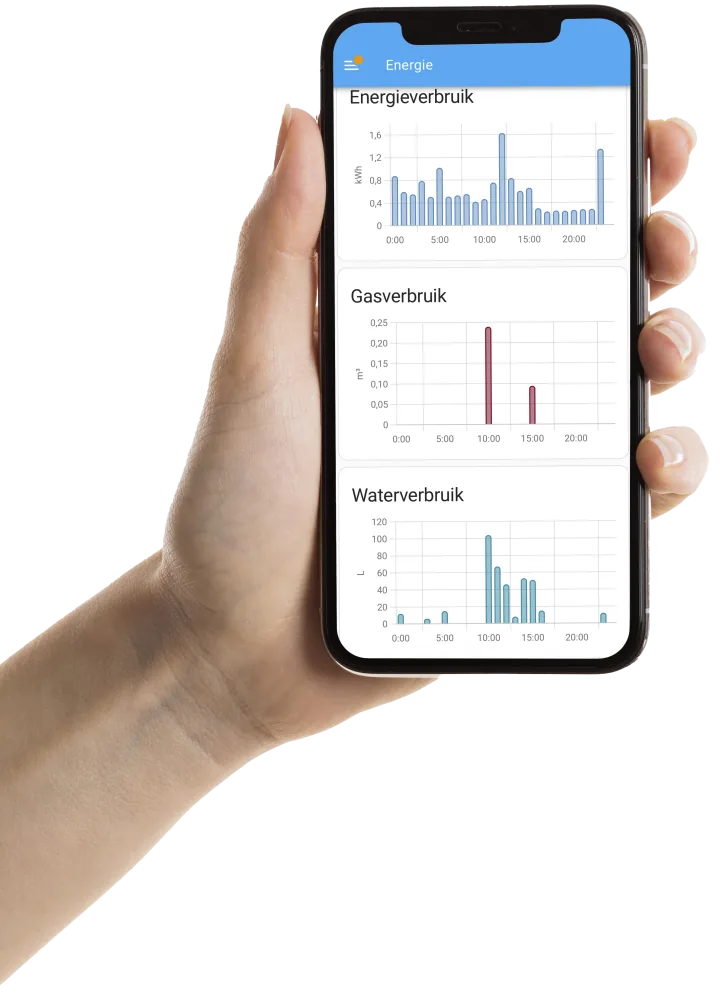
Energy Dashboard
Full integration with the Home Assistant Energy Dashboard for real-time insights.
Modular & Flexible
Choose exactly what you need: energy only, water only, or both combined.
Expansion Port
Add extra sensors like a water leak sensor or door contact.
"The V4 is a game-changer! The detachable water sensor gave me the flexibility to monitor only my water meter without hassle with the P1 port. Later I could easily expand to energy monitoring. The optional water leak sensor has already saved me once from water damage. This modular approach is brilliant – exactly what I needed for my setup!"
 Happy customer
Ready in 3 steps, under 2 minutes
Mount holder, connect power/network and link to Home Assistant.
Place the universal holder
Click the universal holder onto your water meter. Fits most European analog meters.
Power and network
Power via USB-C or PoE; data via WiFi or Ethernet. Install the corresponding firmware for Ethernet.
Power via USB-C or PoE; data via WiFi or Ethernet. Install the corresponding firmware for Ethernet.
Add to Home Assistant
Open Home Assistant → Settings → Devices & Services → Integrations.
- ESPHome: WaterP1MeterKit usually appears automatically. Click Configure and follow the steps.
- Energy Dashboard: Settings → Dashboards → Energy; select water and DSMR (P1) entities from the kit.
Open Source and 100% Local with ESPHome
Our firmware is built on ESPHome. The entire configuration is transparent and adjustable. Everything runs locally without cloud dependency. Integrate directly into Home Assistant and manage updates yourself.
Fully Open Source
All source code is available on GitHub. Customize the firmware to your needs.
Built on ESPHome
Runs on ESPHome, the most popular open-source IoT platform. OTA updates, no cloud needed.
100% Local & Private
All data stays within your own network. No cloud, no subscription, no data collection.
Technical details · ESPHome / MQTT / HTTP
ESPHome · MQTT · HTTP
For advanced users: 100% freedom
For advanced users: these integrations require custom ESPHome configuration. MQTT, TLS and HTTP are not preconfigured API services. Follow the documentation for your firmware.
Use Home Assistant for dashboards and automations. Without Home Assistant, custom ESPHome firmware can use MQTT, for example. DSMR Reader handles energy data, not the separate water sensor.
ESPHome without Home Assistant
- Use an MQTT broker (e.g., Mosquitto). Process topics in your own apps or automations.
- Integrate with Node‑RED, OpenHAB, Homey or Domoticz via MQTT nodes/adapters.
- Write data to InfluxDB (via Telegraf or Node‑RED) and visualize in Grafana.
- The ESPHome native API is optional; universal coupling works with
mqtt:in the device config.
MQTT
For advanced users: these integrations require custom ESPHome configuration. MQTT, TLS and HTTP are not preconfigured API services. Follow the documentation for your firmware. ESPHome MQTT
REST / HTTP
For advanced users: these integrations require custom ESPHome configuration. MQTT, TLS and HTTP are not preconfigured API services. Follow the documentation for your firmware. ESPHome HTTP
Why WaterP1MeterKit V4?
What customers say
Real experiences with WaterP1MeterKit
"The WaterP1MeterKit has completely changed my view on energy management. It was a breeze to install and integrate directly with my Home Assistant system. Now I can monitor my water and electricity consumption in real time. The Energy Dashboard in Home Assistant is ideal."
""
Translated from Dutch Original (Dutch)
"I am truly impressed by the WaterP1MeterKit! It has completely changed my approach to managing energy and water consumption. Now I can keep an eye on everything and adjust as needed. A smart addition to our home!"
""
Translated from Dutch Original (Dutch)
"The installation of the WaterP1MeterKit was surprisingly simple and the integration with Home Assistant works flawlessly. It's fantastic to monitor both my energy and water consumption from a single app. Truly a gamechanger!"
""
Translated from Dutch Original (Dutch)
"Since I started using the WaterP1MeterKit, I have become much more aware of my consumption. It helps us live more sustainably and save on our bills. Moreover, the Ethernet and PoE support are extremely handy!"
""
Translated from Dutch Original (Dutch)
"I was looking for a way to better monitor my usage and came across the WaterP1MeterKit. What a fantastic device! The data it delivers is very accurate, and it displays both water and energy consumption in an excellent way."
""
Translated from Dutch Original (Dutch)
"The WaterP1MeterKit is incredible! I love how easy it is to set up and the data is always accurate."
""
Translated from Dutch Original (Dutch)
Frequently Asked Questions
The WaterP1MeterKit V4 combines water and energy monitoring in one device. You can read only your smart meter, only your water meter, or both at the same time. The V4 supports WiFi, Ethernet and PoE, has a detachable water sensor with a 3-meter cable and includes an extra expansion port for a water leak sensor or door sensor.
In daily use the V4 works like the V3, but it uses updated hardware that is also prepared for Thread/OpenThread. For normal use, WiFi, Ethernet and PoE remain the most practical options. The detachable water sensor, P1 connection and extra expansion port are still included.
Yes. The V4 shows your water and energy usage in real time in Home Assistant. You can choose to use only the P1 connection, only the water sensor, or combine both for a complete overview.
The V4 is designed for DSMR smart meters with a P1 port and most common analog water meters in the Netherlands and Belgium. If you are not sure, check the compatibility list or contact us with a photo of your water meter.
No. Thread uses the same 2.4 GHz radio technology as Zigbee, but it is a different protocol. You do not pair the WaterP1MeterKit V4 as a Zigbee device. For most customers we recommend WiFi or Ethernet; Thread/OpenThread is mainly useful if you intentionally use a Thread network.
The V4 is prepared for Thread/OpenThread, but it ships with WiFi firmware by default. Ethernet firmware can be installed via our firmware page. Only use OpenThread when you have a suitable Thread network, matching firmware and Home Assistant configuration. WiFi or Ethernet/PoE remains the recommended choice for most installations.
Place the water sensor on your water meter using the universal holder, optionally connect the RJ12 cable to your smart meter's P1 port and connect the V4 to your network. By default you use WiFi. If you want Ethernet or PoE, install the Ethernet firmware through our firmware page.
The detachable water sensor with a 3-meter cable gives you more installation freedom. You can place the main unit near your smart meter or network connection and mount the water sensor exactly on the water meter. This is useful when your water meter and meter cabinet are not next to each other.
Yes. The V4 ships with WiFi firmware by default. If you want Ethernet, you can install the Ethernet firmware yourself through our firmware page. The hardware is the same; the firmware determines whether you use WiFi or Ethernet.
For a Thread network you need a Thread border router that connects your Thread network to your regular network and Home Assistant. Without such a Thread network, use the V4 via WiFi or Ethernet.
Yes. The V4 has an extra expansion port for an optional water leak sensor or door sensor. This sensor is sold separately and can be used in Home Assistant alongside your water and energy data.
You can power the V4 via USB-C or via PoE. PoE is convenient because power and network run over one Ethernet cable, but it requires a PoE switch or PoE injector. USB-C always works as an alternative power option.
Still have questions?
Get in touch with us
Technical Specifications
Connection to Water and Energy Meter
- Water meter: Direct connection with a universal holder for mounting the detachable water sensor on the 1-liter metal indicator of the water meter.
- Energy meter: RJ12 port for direct connection to DSMR-compatible energy meters.
Network Connection
- Wi-Fi IEEE 802.11 b/g/n (2.4 GHz), supports WPA/WPA2 security.
- Ethernet connection with support for Power over Ethernet (PoE) for a direct and stable network connection.
- Prepared for Thread/OpenThread via IEEE 802.15.4 radio. This is not Zigbee pairing and requires matching firmware, a Thread border router and Home Assistant configuration.
Data Transfer
- Water consumption update interval: Every 1 liter.
- Energy consumption update interval: Every second for real-time insight.
Physical Dimensions of the Kit
92 x 47.5 x 26.5 mm
Cable Length
- RJ12 cable for energy meter: 2 meters.
- USB-C cable for power: 3 meters.
- Water sensor cable: 3 meters with detachable water sensor.
Power Supply
- USB-C port for power supply (5V, 1A) with included USB adapter (if chosen).
- Alternative power supply via PoE for an integrated solution without additional power cables.
Operational Classification
IP20 (suitable for indoor use).
Temperature Range
Operational from -10 °C to +40 °C.
Compatibility
Compatible with DSMR versions 4.0 and 5.0 for energy meters and with all common water meters as listed on our website; contact us if you are unsure.
Software
Fully integrated with Home Assistant. Ships with WiFi firmware by default; Ethernet firmware can be installed via our firmware page. Thread/OpenThread depends on matching firmware and network configuration.
Included
- Detachable water sensor with 3-meter cable.
- Universal holder with screws for easy installation on the water meter.
- RJ12 cable for DSMR energy meter.
- Quick Start Guide.